Introduction
The rapid advancement in Large Language Models (LLMs) has been truly astounding, bringing powerful AI capabilities to the forefront. However, many of these cutting-edge models often demand significant computational resources, particularly modern GPUs with substantial VRAM. This can be a barrier for enthusiasts and developers working with older or more modest hardware.
This post explores the feasibility and approaches to running recent LLMs, specifically Qwen3.5 and Gemma4, on older hardware. While it won’t be a seamless experience akin to state-of-the-art systems, with the right strategies, you can still leverage these models for various tasks.
Challenges of Old Hardware
Older hardware, typically characterized by:
- Less VRAM/RAM: Limits the size of models that can be loaded.
- Slower CPU/GPU: Increases inference time significantly.
- Older Architectures: May lack specific instruction sets or optimizations present in newer hardware.
Strategies for Running LLMs on Old Hardware
To mitigate these challenges, several techniques can be employed:
1. Quantization
Quantization is perhaps the most crucial technique. It involves reducing the precision of the model’s weights (e.g., from FP16/BF16 to INT8, INT4, or even binary). This dramatically reduces the model’s memory footprint and can also speed up inference, sometimes at the cost of a slight reduction in accuracy.
- Tools: Platforms like Ollama simplify running quantized models. Other libraries like
bitsandbytesandquantoare also excellent. These often support various quantization formats (e.g., GGUF, AWQ, GPTQ).
2. Smaller Model Variants
Many popular LLMs, including Qwen and Gemma, are released in multiple sizes (e.g., 7B, 2B, etc.). Opting for the smallest available variant that still meets your needs is a straightforward way to reduce resource demands.
3. CPU Inference
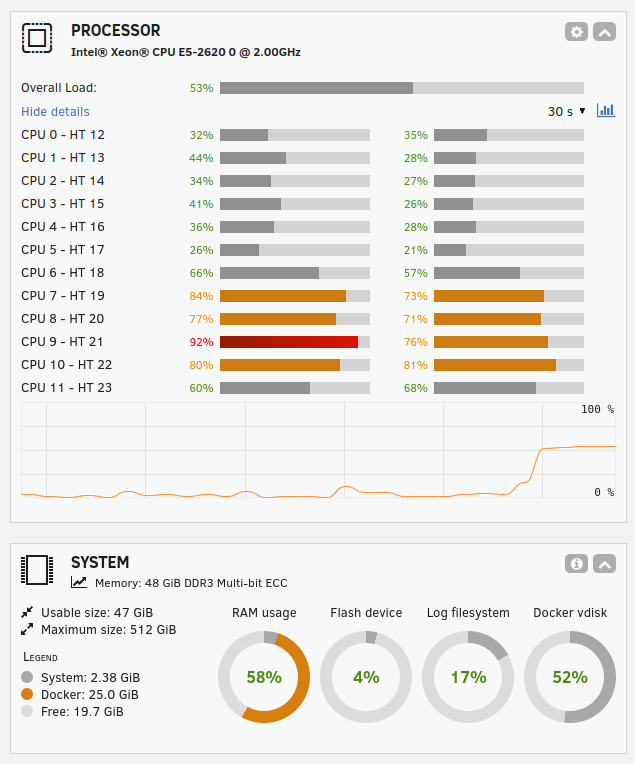
If your older GPU has insufficient VRAM, running inference entirely on the CPU is an option. While slower, even old CPUs can still handle smaller quantized models. In my case, my old Unraid server has a decade old CPU: Intel® Xeon® CPU E5-2620 0 @ 2.00GHz
- Tools: Ollama provides an easy way to run models on CPU, leveraging underlying optimizations for efficient CPU inference and multiple CPU cores.
4. Batching and Optimizations
For specific use cases, optimizations like:
- Batching: Processing multiple prompts at once can improve GPU utilization, but increases VRAM.
- FlashAttention: If your GPU supports it, FlashAttention can reduce VRAM usage during the attention mechanism. (Less likely on very old hardware, but worth checking.)
Case Study: The Challenge with Qwen 3.5
An interesting challenge arose when attempting to run Qwen 3.5. Unlike previous models, the latest Qwen is a Mixture of Experts (MoE) model. This advanced architecture relies on newer technologies, specifically “Flash Attention,” for efficient operation.
Unfortunately, older GPUs like the AMD RX590 lack hardware support for Flash Attention. This incompatibility leads to a critical failure during inference. When attempting to run Qwen 3.5 on either the RX590 or the CPU-only server, the result was the same: a continuous stream of nonsensical, garbage text that would not stop.

On the other hand, an older Qwen 2.5 model works fine on such an old GPU:
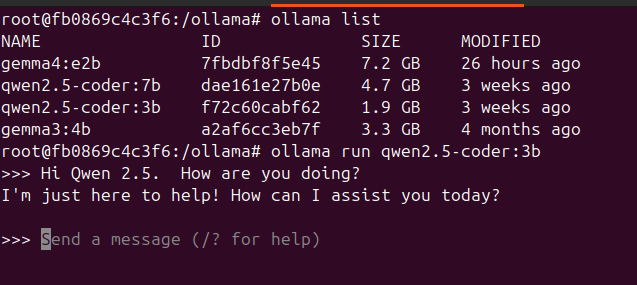
This highlights a key takeaway: as LLM architectures evolve, they may introduce dependencies on specific hardware features, making them incompatible with older systems, even with techniques like quantization.
Case Study: Gemma4 on Old Hardware
Gemma, being a more recent and efficient model family from Google, is a good candidate for older hardware due to its design. Its smaller variants and optimized architecture make it more accessible.
Scenario 1: Gemma4:e2b on Ubuntu 24.04 with AMD RX590 (8GB VRAM)
This scenario involves using a mid-range, older AMD GPU. The key considerations here are:
- Model Variant:
gemma4:e2blikely refers to an optimized 2-billion parameter model. This size is highly suitable for an 8GB VRAM GPU, especially when quantized. - Quantization: For optimal performance and VRAM fit, aim for 4-bit (Q4) or 5-bit (Q5) quantization. This allows the model to comfortably reside in the 8GB VRAM.
- Frameworks: Ollama is recommended for its ease of use. In my case, I run a custom-built container that makes my RX590 work with the latest versions of Ollama (v0.20.2).
- Expected Performance: With proper quantization and GPU acceleration, inference should be reasonably fast for a model of this size, offering a good balance of speed and capability.
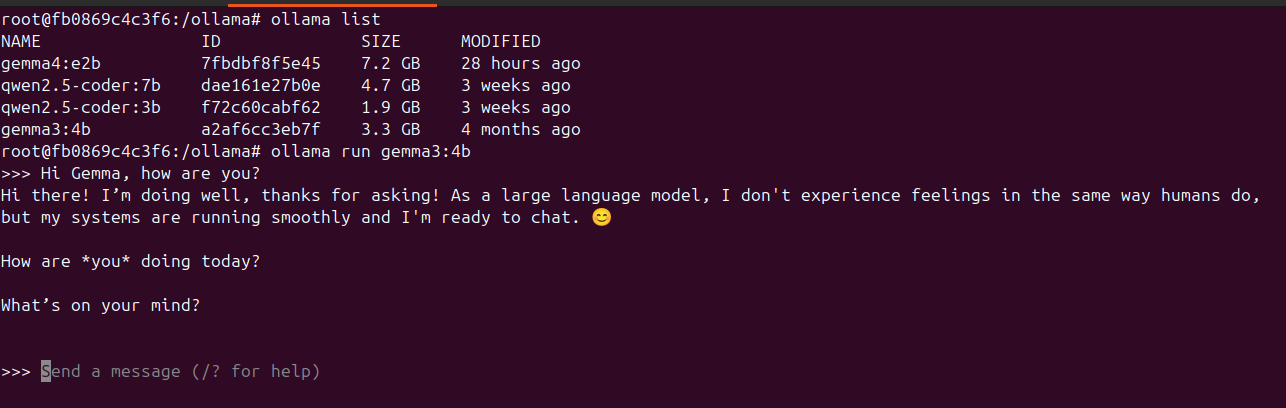
Which runs completely on the old GPU:

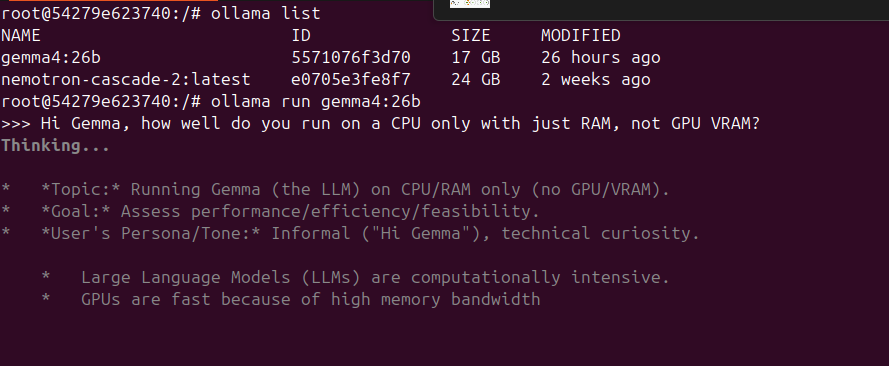
Scenario 2: Gemma4:26b on HP Z820 with Unraid 7.2 (CPU only, 48GB RAM)
This setup emphasizes CPU-only inference with a substantial amount of RAM. The CPU were a decade old: Intel® Xeon® CPU E5-2620 0 @ 2.00GHz
- Model Variant:
gemma4:26bindicates a 26-billion parameter model. Running this solely on CPU will be a demanding task. - Quantization: Quantization is critical for managing RAM usage and improving CPU inference speed. While 48GB of RAM is ample, a 26B model in full precision might consume a significant portion. Aim for 4-bit, 5-bit, or even 8-bit quantization to balance quality and performance.
- Frameworks: Ollama excels in CPU-only scenarios, leveraging multiple CPU cores efficiently. On Unraid, running Ollama within a Docker container is a straightforward approach, ensuring it can access your system’s CPU resources effectively.
- Expected Performance: Inference will be slower compared to GPU acceleration. However, with a powerful multi-core CPU (common in Z820 workstations) and sufficient RAM, you can still achieve usable inference speeds for batch processing or less latency-sensitive applications. The 48GB RAM is more than enough to load even highly quantized versions of a 26B model.
Running inside the Ollama container on my old Unraid server:
The Unraid console is showing the CPU usage and amount of RAM used:
Practical Considerations and Expectations
- Speed: Expect slower inference times. A response that takes seconds on a powerful GPU might take minutes on older hardware.
- Model Size vs. Performance: You’ll need to find a balance between model size (and thus capability) and what your hardware can reasonably handle.
- Context Size: Inevitably, you’ll have a much smaller context size to work with like 4096 or 8192.
- Setup Complexity: Setting up these models on older hardware, especially with custom quantization or specific Ollama builds, can require some technical expertise.
- OS/Driver Support: Ensure your operating system and GPU drivers are as up-to-date as possible for your specific hardware to get the best performance.
Conclusion
While running Qwen3.5 and Gemma4 on old hardware presents significant challenges, it is sometimes not impossible. By leveraging quantization, selecting smaller model variants, and utilizing user-friendly platforms like Ollama, you can still experiment with and derive value from these powerful LLMs. The key is to manage expectations regarding performance and be prepared for a more involved setup process. Happy prompting!
More in this series…
- AMD GPUs - Running Ollama with AMD cards.